Come visit the Micro Center Knowledge Expert Center and check out the how-tos, FAQ's, Technotes and the Forum.
http://www.mctsol.com/
header

Welcome to the Micro Center Tech Support Blog!
Find free technical support on a variety of products featured at Micro Center and plenty of how-tos on new technology. Start searching our Blog below or search our Tech Center archives »
Can't find what your looking for? Take advantage of our Tech Support services »
Join the MC Tech Support Community Forum: Get direct advice from the Knowledge Experts @ Micro Center.
Click here to access the Forum »
Tuesday, September 28, 2010


Friday, September 24, 2010
Micro Center Technical Support Online is LIVE!!!
Come visit the Micro Center Knowledge Expert Center. We're lucky to have some of the best minds and resources in computer technology at our fingertips, and we'd like to share these resources with you. Here you will find many self help items such as how-tos, FAQ's, and Technotes to help you with most questions about your product, plus input on how to keep things running smoothly down the road.
http://www.mctsol.com/
http://www.mctsol.com/
So you got that iPad... Do you know how to connect it your wireless network??
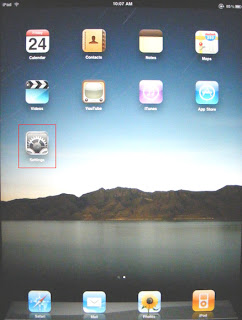
Start at the "Home" Screen on the iPad and select the Settings icon.
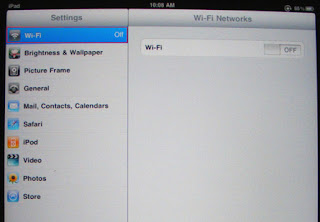
Next Select "Wi-Fi" to check if wireless is turned on.
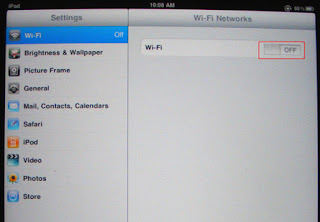
If "Wi-Fi" is off, Slide the Wi-Fi button to the right until is states "On".
Once the Wi-Fi is on, the iPad will display all the networks within range.
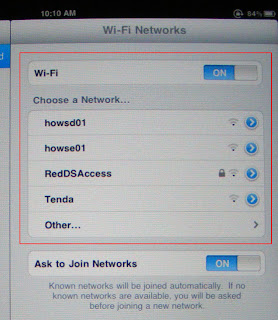
Select the network you want to connect to.
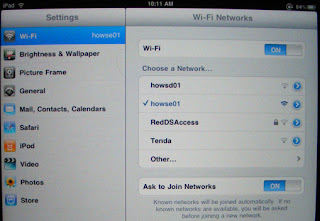
Now you are connected! Push the "Home" button and enjoy!

Next Select "Wi-Fi" to check if wireless is turned on.

If "Wi-Fi" is off, Slide the Wi-Fi button to the right until is states "On".

Once the Wi-Fi is on, the iPad will display all the networks within range.

Select the network you want to connect to.

Now you are connected! Push the "Home" button and enjoy!
Subscribe to:
Posts (Atom)